Advertiser Disclosure

Many of the credit card offers that appear on this site are from credit card companies from which we may receive financial compensation when a customer clicks on a link, when an application is approved, or when an account is opened. This compensation may impact how and where products appear on this site (including, for example, the order in which they appear). However, the credit card information that we publish has been written and evaluated by experts who know these products inside out. We only recommend products we either use ourselves or endorse. This site does not include all credit card companies or all available credit card offers that are on the market. See our advertising policy here where we list advertisers that we work with, and how we make money. You can also review our credit card rating methodology.

Apple Adds Passports to Apple Wallet as Digital ID Option

Chris Hassan's image
Chris Hassan
Edited by: Ryan Smith
Jump to Section

We may be compensated when you click on a link, when an application is approved, or when an account is opened from one or more of our advertising partners. Terms apply to the offers below. See our Advertising Policy for more about our partners, how we make money, and our rating methodology. Opinions and recommendations are ours alone.

Click for Card Offers (Up to 300k!)

Top Partner Offers

LIMITED-TIME OFFERChase Sapphire Preferred® Card

Chase Sapphire Preferred® Card

Apply Now(at Chase's secure site)
Earn 75000 100,000 Points
BEST LOUNGE CARD
Platinum Card® from American Express

Platinum Card® from American Express

Apply Now(at Amex's secure site)
As High As 175,000 Points. Find Out Your Offer.
BEST FOR DINING
American Express® Gold Card

American Express® Gold Card

Apply Now(at Amex's secure site)
As High As 100,000 Points. Find Out Your Offer.
NEW OFFERThe Business Platinum Card® from American Express

The Business Platinum Card® from American Express

Apply Now(at Amex's secure site)
Earn As High As 300,000 points. Find Out Your Offer.

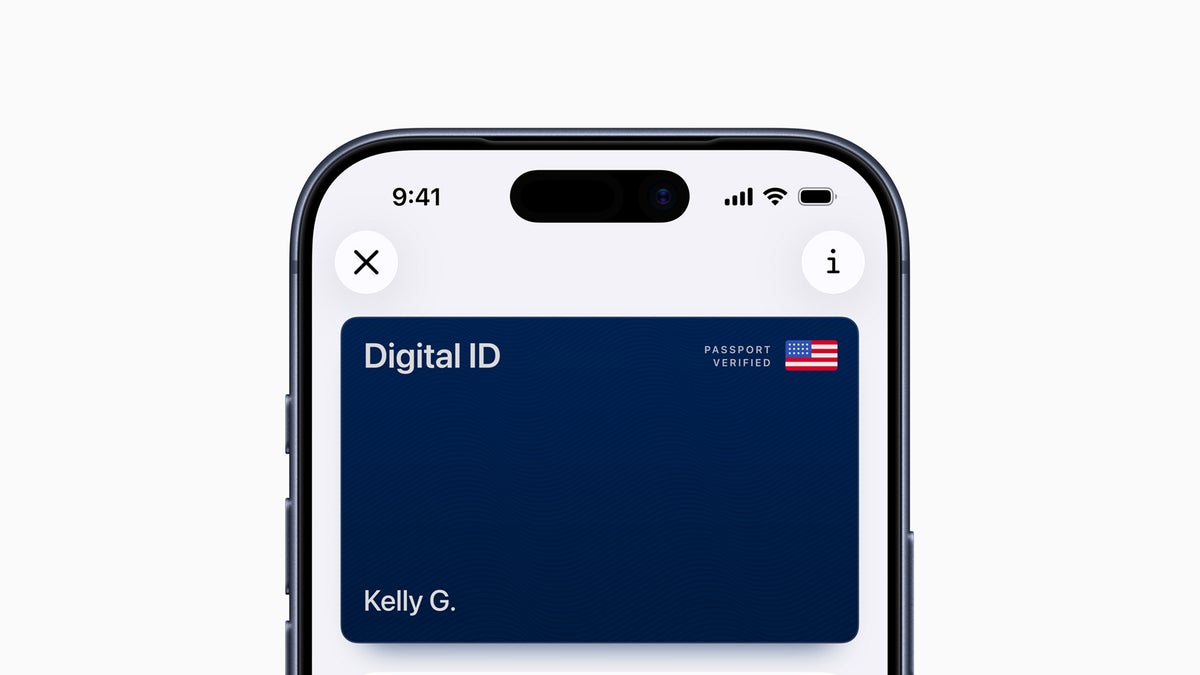
Apple just unveiled Digital ID, which allows iPhone and Apple Watch users to add their U.S. passports to their Apple Wallet digitally.

This new option is REAL ID compliant, which means you can now use your phone or watch to get through TSA airport security — and do so without fumbling for your physical ID.

While some states offer a digital ID, now all travelers with a valid U.S. passport can unlock the convenience of adding an official ID to their digital wallet.

Let’s take a look at the details.

Advertisement

Apple Digital ID

Apple has announced the introduction of Digital ID, which allows iPhone and Apple Watch users the option to add their valid U.S. passport to their Apple Wallet.

During the beta testing rollout period, travelers can use their digital passport as a REAL ID for identity verification during domestic travel at more than 250 U.S. airports.

Apple Mobile ID Passport
Image Credit: Chris Hassan

However, Digital ID is not valid for international travel and border crossings, so you will still need to carry your physical passport if you are traveling abroad … for now.

Apple has had the option to add a driver’s license or state ID to Apple Wallet since 2022, but states have been slow to sign on. As of now, only 12 states and Puerto Rico are currently offering a digital version of their ID.

With the launch of Digital ID, we’re excited to expand the ways users can store and present their identity — all with the security and privacy built into iPhone and Apple Watch. Since introducing the ability to add a driver’s license or state ID to Apple Wallet in 2022, we’ve seen how much users love having their ID right on their devices. Digital ID brings this secure and convenient option to even more users across the country, as they can now add an ID to Wallet using information from their U.S. passport.

Jennifer Bailey, vice president of Apple Pay and Apple Wallet

To present your Digital ID passport at participating TSA locations, double-click the side button on your iPhone or Apple Watch to open your Apple Wallet. Then, select your passport and hold your phone near the TSA reader.

Apple Digital ID in Wallet passport 1
Image Credit: Apple

Once your photo has been taken, you will receive a request to provide the basic information stored in your Digital ID. Approve this request with your Face ID, and you’re all set.

Hot Tip:

Although you can add your U.S. passport to your Apple Wallet, the digital version is only valid for domestic travel, not international border crossings.

How To Add Your Passport

Like most things in the Apple ecosystem, adding your passport as a Digital ID is easy.

Before you begin, ensure your iPhone is updated to the latest iOS version and have your physical passport readily available.

Then, follow these steps:

  • Open the Wallet app
  • Tap the Add (+) button
  • Select Driver’s License or ID Cards
  • Select Digital ID
  • Follow onscreen instructions

The instructions will walk users through the 2-minute process, which includes scanning the photo page of their physical passport and then tapping the back page of the passport where the embedded chip is located.

Finally, a verification selfie is required. Be sure to position yourself in a location with good lighting to minimize errors. Once complete, verification takes a few minutes, and a notification will be sent when the new Digital ID is added to your Apple Wallet.

Advertisement

Final Thoughts

Apple has launched Digital ID, which allows users to add their U.S. passports to their Apple Wallet. This functions as a REAL ID, giving travelers the option to tap their iPhone or Apple Watch at more than 250 participating TSA locations nationwide.

Now, travelers can keep their physical ID in their wallet during domestic trips, making the process of getting through airport security faster and easier.

Chris Hassan's image

About Chris Hassan

Chris holds a B.S. in Hospitality and Tourism Management and managed social media for all Marriott properties in South America, making him a perfect fit for UP and its social media channels. He has a passion for making content catered toward family travelers.

INSIDERS ONLY: UP PULSE

Deluxe Travel Provided by UP Pulse

Get the latest travel tips, crucial news, flight & hotel deal alerts...

Plus — expert strategies to maximize your points & miles by joining our (free) newsletter.

We respect your privacy. This site is protected by reCAPTCHA. Google's privacy policy  and terms of service  apply.

Deluxe Travel Provided by UP Pulse

We Recommend

Chase Sapphire Preferred® Card

Welcome Offer: 75,000 100,000 points

  • Earn 100,000 bonus points after you spend $5,000 on purchases in the first 3 months from account opening.
  • Enjoy benefits such as 5x on travel purchased through Chase Travel℠, 3x on dining, 3x on vacation homes, 3x on gas & EV charging, 3x on top streaming services and online groceries (excluding Walmart, Target, and wholesale clubs), 2x on all other travel purchases, 1x on all other purchases
Show more
  • Earn up to $100 in statement credits each account anniversary year for hotel stays through Chase Travel
  • Count on Trip Cancellation/Interruption Insurance, Auto Rental Collision Damage Waiver, Lost Luggage Insurance and more.
  • Get a year of complimentary Apple TV when activated by December 31, 2026 - a value of $156.
  • Complimentary DashPass which unlocks $0 delivery fees & lower service fees for a min. of one year when you activate by 12/31/27. Plus, a $10 promo each month on non-restaurant orders.
  • Receive one statement credit of up to $120 every four years as reimbursement for the application fee charged to your card for a Global Entry, TSA Precheck® or NEXUS application.
  • Transfer points to leading airline and hotel loyalty programs
  • Member FDIC
DMCA.com Protection Status